Where Should Your ERP Server Live?
 Download PDF
 A Practical Framework For The Deployment Decision
There’s a question quietly disappearing from the ERP conversations happening at fastener distributors right now: where does your server live? For a growing number of vendors, the answer is no longer yours to give. Cloud. That’s it. Migration timeline attached. New pricing model attached. Take it or take it.
We at Computer Insights see this differently. We think where your ERP server lives is a real business decision — one with meaningful tradeoffs in cost, resilience, and control — and one that should be made by you, not for you. The Business EdgeTM runs on whatever deployment model you choose: on your own server, in a co-location facility, in a managed hosting facility, or in the cloud. From the software’s perspective, those four options are identical. From your business’s perspective, they’re very different.
This article walks through the four options, the dimensions that actually matter when you’re deciding between them, and a few scenarios that show how different distributors land on different answers. The goal is to help you make the decision the right way — with the facts, in your own context — rather than have it made for you in a vendor’s roadmap meeting.
The Places Your Server Can Live
- On-premises – The server sits in your building. You own it. But you don’t manage it — we treat your on-prem TBE server like an appliance and handle it remotely. What you provide is straightforward: a network connection, power, limited internet access, and a cool, dry place to put it. Hardware lifecycle is typically three to five years, after which you refresh. There’s no monthly hosting bill — just a one-time hardware purchase and an optional maintenance agreement.
- Co-location – A server you own lives in a professional facility — a “colo” — that handles power, cooling, physical security, and network connectivity. You pay a monthly facility fee. We manage the server remotely (the same appliance model as on-prem), and your user experience is the same as if it were down the hall.
- Managed hosting – A close cousin of co-location: the hosting provider owns the hardware rather than you, and you pay an all-in monthly rate instead of buying a server. Same off-site facility model, same remote management by us, same user experience.
- Cloud – You rent compute capacity from Azure or AWS, monthly, indefinitely. The cloud provider handles the physical infrastructure underneath, but the cloud environment itself — compute instance configuration, VPN setup, ongoing infrastructure management — is yours to manage. We give you the specs and the OS image; you stand up the environment. Once it’s running, we configure TBE on it and handle the application from there.
In every case, your users connect to The Business EdgeTM through a VPN — the connection that makes the server appear as if it’s on the local network. That’s true whether the server is in the next room or in a Microsoft datacenter. A 65-location fastener distributor with an on premises server keeps that server in one place; the other 64 locations connect over VPN. The user experience is the same.
From the software’s perspective, that’s the entire technical conversation. The Business EdgeTM doesn’t care where it runs — and the workstation application doesn’t care what your users run it on, either. Windows, macOS, Linux: same TBE, same experience. Same code, same features, same data flow. The maintenance cost is the same too. But the business conversation is just getting started.
The Dimensions That Actually Matter
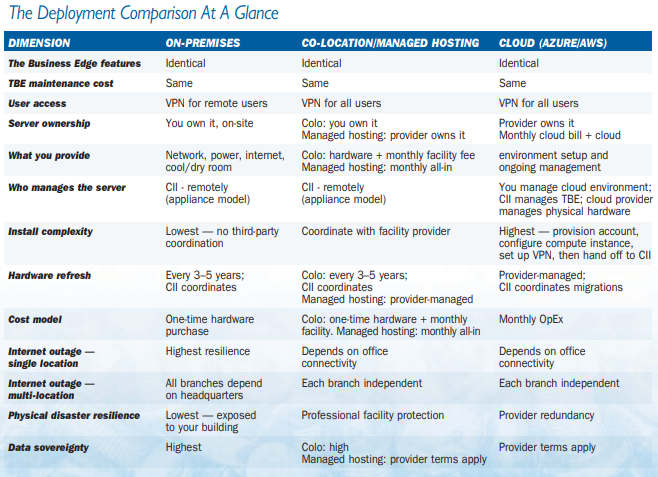
Cost structure. On-premises is capital expenditure: you buy a server, you depreciate it, and you replace it in three to five years. Co-location adds a monthly facility fee on top of the hardware purchase. Managed hosting shifts that to an all-in monthly fee — no hardware purchase, since the provider owns the equipment. Cloud is pure operating expenditure: a monthly bill that continues for as long as you run the system. Each model is reasonable. None of them is universally cheaper than the others. Over a five-year hardware lifecycle, on-premises hardware costs can be a fraction of equivalent cloud capacity — but cloud sizing, current provider pricing, and your existing infrastructure all shift the math. Before committing to any deployment model, run a sizing analysis.
- Resilience – This is where the conventional wisdom gets it wrong, especially for multi-location distributors.
If you have one location, on-premises is the most resilient option for an internet outage. Your local network keeps working. Your users in that building keep working. Cloud and co-lo go dark.
But if you have multiple locations, the math flips. With on-premises, every branch depends on the headquarters’ internet connection. If HQ’s link goes down, all your other locations are stranded — even though their own internet is fine. With cloud or co-location, each office depends only on its own connectivity and the provider’s uptime. Lose one branch’s connection, and only that branch is affected. The rest of the company keeps running.
This catches a lot of distributors by surprise. The intuition is that “having the server here” feels safer. For a single shop, it usually is. For a multi-branch operation, it usually isn’t. - Physical disaster recovery – Theft, fire, hurricane, flood — the on-premises server is exposed to whatever happens to your building. Co location and cloud both put the hardware in facilities engineered for this exact risk. If you’re in a region with hurricane or wildfire exposure, this dimension probably matters more than the others.
- Data sovereignty – On-premises is the highest sovereignty option: you own the hardware, the data sits in your building, no third party has physical access. Co-location is similar — you own the hardware, but a third party owns the building. Managed hosting splits the difference: the provider owns the hardware too, so sovereignty is closer to cloud. Cloud means your data lives on infrastructure governed by the cloud provider’s terms of service. For most fastener distributors this isn’t a deciding factor, but for those with specific contractual obligations to their own customers, it can be.
- What you actually have to manage – This is the dimension where most ERP vendors get the on-prem story wrong, and it’s worth slowing down on. The conventional wisdom — that on-prem means you’re “in the server business” — assumes the vendor leaves you to manage the hardware yourself. We don’t. Your TBE on-prem server is an appliance. We monitor it, patch it, back it up, and manage it remotely. Your IT responsibility starts and ends with providing network, power, internet, and a cool dry room.
In practice, that makes on-prem the easiest of the four deployments to set up — not the hardest. There’s no third-party facility to coordinate with, no cloud environment to manage, no migration project. If your business already has a VPN for the local network (most do), there’s literally nothing extra for your team to configure. Plug the server in. Done.Co-location adds the third-party facility coordination but keeps the same appliance management model — we manage the server remotely whether it’s in your building, in a colo, or in a managed hosting facility. Cloud is a different model entirely. You don’t own hardware, but you do own the cloud environment — the compute instance, the VPN configuration, the infrastructure layer that the cloud provider doesn’t manage and we don’t either. We give you the specs and the OS image; you stand up the environment. Once it’s running, we configure The Business EdgeTM on it and run the application from there.
In other words: we manage TBE in all four deployments. For on-prem, co-location, and managed hosting, we manage the server itself — as an appliance — too. For cloud, the cloud environment is yours, and the moving pieces multiply.
What This Looks Like In Practice
A few scenarios drawn from the kind of conversations we have with fastener distributors:
- The single-location shop – A 40-person operation, one building, reliable internet. This is the most common case we see, and on-premises is almost always the right answer. Lowest total cost over five years. Highest resilience during an internet outage — local users keep working. And no day-to-day IT responsibility for the server — we manage it remotely; they keep it powered up in a cool, dry corner. If they’re in a hurricane or wildfire region, co-location is the next step up. Otherwise, on-prem is the answer.
- The multi-branch distributor – Six locations, headquarters in one city, branches across two states. Each branch has its own internet. This is the scenario where the conventional wisdom flips. An on-premises server at HQ means every branch depends on HQ’s internet connection — lose that, lose six locations. Cloud or co-location lets each branch run independently of any other office. The math on cloud-versus-co-lo comes down to a real tradeoff: co-location keeps the appliance management model (we still manage the server remotely, just in someone else’s facility), while cloud delivers the same multi-branch independence but transfers the infrastructure management to you. For most multi-branch distributors, co-location is the simpler answer.
- The growing distributor not sure where they’ll be in five years. If you might acquire another shop, open a new branch, or consolidate locations within the hardware lifecycle, cloud’s flexibility is worth paying for. You can scale up or down without buying or stranding hardware. The OpEx model is more expensive on paper, but it’s reversible — and reversibility has real value when the business is in motion. The tradeoff is that cloud also means owning the cloud environment, with all that entails. For a business in motion, that’s usually a fair trade.
Deciding to manage a server on-premises vs. the cloud is a big decision, with pros and cons for each option. Having the flexibility to make the right decision for my company’s specific needs is just one of the ways Computer Insights adds value for its clients.
— SCOTT HABETZ, CFO @ STS INDUSTRIAL, INC.
Where Computer Insights Fits
What we believe — and what we’ve built The Business EdgeTM around — is that this decision shouldn’t be made by us. So we built the software torun identically on all four deployment models, and we built our service around supporting whatever you choose.
In practice, that means we manage TBE for you in all four deployments. For on-prem, co-location, and managed hosting, we also manage the server itself — as an appliance, remotely. We monitor it, patch it, back it up, and coordinate the hardware refresh when it comes due. For cloud, the environment is yours to stand up and operate; we hand off after the environment is ready, configure TBE, and run the application from there.
It also means we back you up when something goes wrong. If a hardware failure takes down your on-premises server, we ship a replacement — next day air when the situation calls for it — and bring you back up. That’s a relationship promise that doesn’t show up on a feature comparison chart, but it’s the difference between a bad day and a bad week.
And it means we don’t lock you into a deployment model. If you start on-premises and want to move to cloud in five years, we move you. If you start in the cloud and decide on-premises is the right call after all, we move you. The software is the same. The data is yours.
We ran our own server room for years because it was the right call at the time, but when the moment came to move The Business Edge to the cloud, Computer Insights made the transition genuinely painless. They handled the migration with care and zero drama.
— JEFF BINDER, CHAIRMAN @ ABBOTT INTERFAST, LLC
Your Business, Your Way
The fastener industry has always rewarded operators who understand their own business better than anyone else can from the outside. The deployment decision for your ERP server is one of those decisions: nobody else knows your locations, your tolerance for monthly OpEx, your hurricane exposure, or your five-year plan as well as you do.
For most of the distributors we work with, on-premises ends up being the right answer. It’s the lowest total cost over the hardware lifecycle, the simplest to install when you already have a VPN, the most resilient for a singlelocation shop during an internet outage, and — because we manage the server for you as an appliance — it has the fewest moving pieces to worry about. Co-location and managed hosting are the right answer when physical disaster risk is high or when multi-branch independence matters more than capital efficiency; both keep the appliance model, just in someone else’s facility. Cloud is the right answer when the business is in motion and reversibility is worth paying for — accepting that you’ll own and operate the cloud environment in exchange.
But you should be the one to land on the answer. Get a sizing analysis. Walk through the dimensions in your own context. Pick the deployment model that fits the business you actually run.
And pick a vendor that will support whatever you pick — not one that has already made the decision for you.